Ready to turn coding into a hands-on launching adventure? Here are three fun “projectile labs” that blend screen-time logic with real-world physics.
In Citrus Splash, learners code single-shot launches of plastic lemons into targets of varying size and distance; Pom-Pom Precision challenges them to sequence launches and pauses for silent soft-ball tosses; and in Cork Flight Lab, it’s all about dialing in power settings and measuring how far corks fly.
Each activity—whether launching lemons, pom-poms, or corks—follows the same easy pattern:
- Write a one-shot launch program.
- Observe where the object lands
- Then jump back in to tweak things and try again.
Along the way, kids discover cause-and-effect, practice hypothesis-testing (“If I turn power up, it’ll go farther!”), and learn to treat “misses” as clues for their next code adjustment.
Let’s dive into these three launcher labs, where every shot is a mini science experiment and every line of code launches a lesson in problem-solving! 🚀

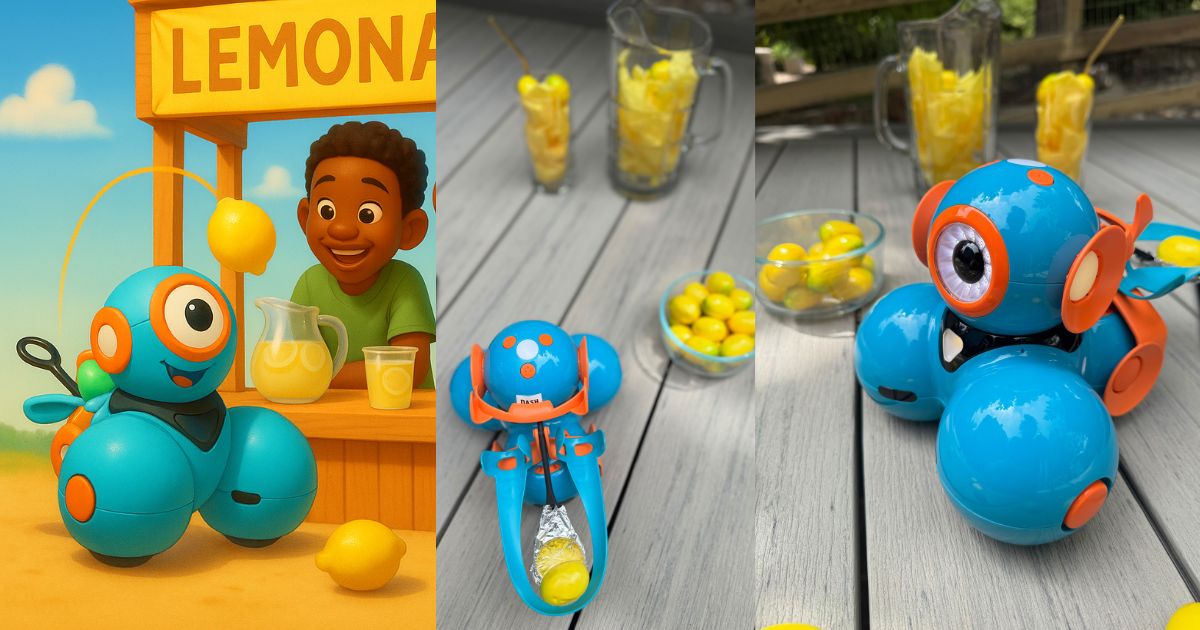
Pro Tip: Cover the launcher basket with aluminum foil to create a sturdy suface for whatever object it is you’re launching.
1. Citrus Splash: Plastic Lemons into the Pitcher 🍋
Setup:
Cover the Launcher basket with aluminum foil, to create a stable pocket.
Slide a small plastic lemon (available here on Amazon) onto Dash’s Launcher. Place a wide bucket at 2–3 feet away, then swap in a narrow pitcher or tall cup for higher difficulty.
Challenge Scaling:
Easy: Wide bucket at ~2 ft away
Medium: Narrow pitcher at ~3 ft
Hard: Shot glass or small vase at ~4 ft
Coding Focus:
One-Shot Program: Write a simple program that does exactly one launch—set your power (10%-100%), then hit “Run.”
Tweak & Try Again: Watch where the lemon lands, then go back into the same program, change the power and run it anew.
Observe & Learn: After each shot, talk through how a little more or less power changed the result.

2. Pom-Pom Precision: Silent Soft Shots 🧶
Setup: Load a 1-inch craft pom-pom (available on Amazon here) into the Launcher. Arrange three different containers—things like plastic cups, paper bowls, or a shoebox hole—for a “target parade.”
Challenge Scaling:
Easy: Big bins at ~1 ft
Medium: Plastic cups at staggered distances (~2 ft, 3 ft, 4 ft)
Hard: Shoebox with a hole cut in the top of it (like cornhole!)
Coding Focus:
Single Launch Sequence: Create a program that fires the launcher once, then includes a brief “wait” (so you can place the next pom pom in the basket and have a partner change the container where it will land).
Adjust & Repeat: Run it, see if the pom-pom lands, then go back and tweak power or wait time to make the sequence work.
Step-by-Step Logic: Talk through each block: “Launch → wait → launch → wait” and why the pause matters when you’re switching targets and placing pom poms.


3. 🚀 Cork Flight Lab: Tweak, Launch & Record
Setup: Collect wine corks or craft-store cork cylinders. Create a straight track marked on the floor with tape, and place a target at the end.
Challenge Scaling:
Easy: Short track with unobstructed target
Medium: Longer track with obstacles – like soft blocks – in the way.
Hard: Place dash on an angled incline for an arc trajectory—predict where the cork will land!
Coding Focus:
Launch & Label: Write one program that launches a cork at your chosen power. Label it “Cork Test.”
Manual Iteration: Run “Cork Test,” measure distance, then reopen your program and change the power blocks % before you run it again.
Record Results: After each run, jot down “Power = 40% → 1 ft” on a piece of paper—then compare each percentage and the distance the object traveled.


We hope that you find that activities like these will help keep young minds sharp all summer.
You can set up these three quick labs—Citrus Splash, Pom-Pom Precision, and Cork Flight Lab—anywhere from the backyard to the living room and with code tweak, kids will practice problem-solving and dodge the dreaded summer slide.
Here’s to a summer of fun experiments, flying objects, and endless “aha!” moments! 🌞🚀









 English
  German
  Spanish
  French
  Polish
  Dutch
Dutch  Portuguese
  Czech
Czech 

