



Giveaway Dash i Launcher

Udostępnij post:

Assign a Coding Pathway in Make Wonder and Enter to Win!

To shine a spotlight on an exciting feature of Make Wonder, we’re awarding a free Dash + Launcher Accessory to one lucky educator, picked randomly from all who assign a Coding Pathway between Nov. 15 and  December 15, 2024. (Free Tier users, there’s a way for you to enter too. Details are at the end of this post). 

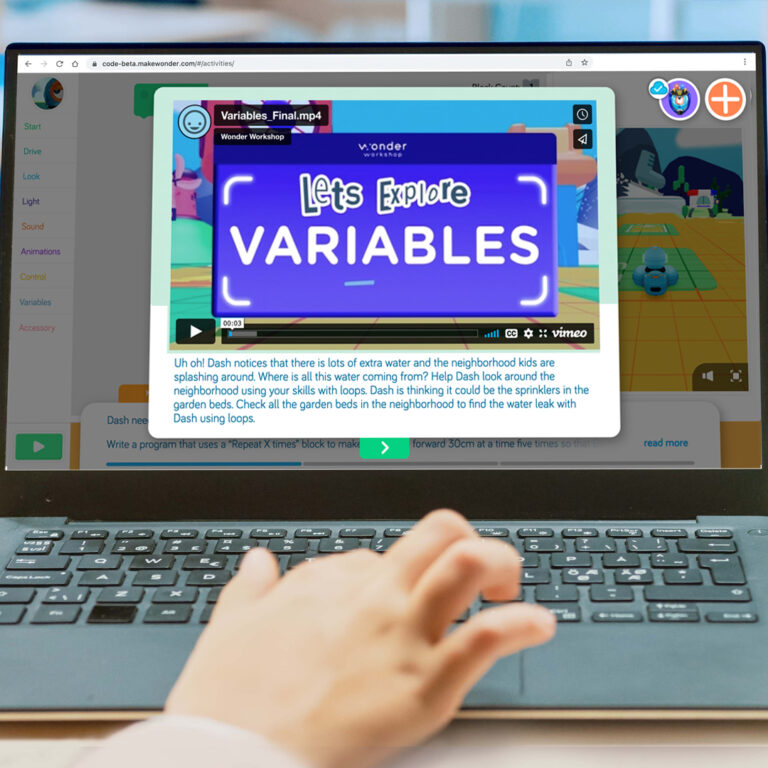
Discover this key feature of a full Make Wonder subscription! Coding Pathways are ready-to-use coding lessons that teach core concepts. Students view instructional videos and tackle step-by-step coding challenges they solve with Blocks that program Virtual Dash right on screen.

With Coding Pathways, you can differentiate instruction by assigning Pathways that match each student’s needs and skill level. Read on to see how to assign a Pathway to entire classroom or to individual students.

How to Assign a Coding Pathway 

  1. Log in to the Make Wonder portal
  2. Navigate to the left side menu and click on the “Assign Coding Pathways” tab
  3. Choose a Coding Level A-F
  4. Click the orange “Assign Pathway” button

5. Pick your classroom

6. Select the students to whom you want to assign the Pathway. You may select the whole class or assign the level to individual students. Each student can only work on one Coding Level (A-F) at a time, but you may assign different levels to individual students within your classrooms based on their skill levels. 

7. Click on the Assign Pathway button

Once you complete these steps, your students can immediately access their assigned Pathway in Blockly and you’ll be entered into the Dash + Launcher Giveaway!

Student View of Coding Pathways 

When your students sign in to Blockly using your teacher code, they will see the assigned Pathway in their Assignments tab. 

Students then make their way through each challenge in their assigned Pathway. Progress is saved in Make Wonder, so students can pick up where they left off the next time they log into Blockly. 

Need Launcher Accessory Inspiration?

Have you used the Launcher accessory in your classroom? We’d love to hear how it went! Share your experience on social media and tag us @wonderworkshop

Check out these videos for fun ways to use the Launcher at home and at school.

Tell Us What Resources You’d Like to See Next

Your feedback helps us create resources and products that better support you and your students. If you have two minutes to spare, let us know your thoughts and ideas!

Giveaway Entry Details

See Giveaway Rules for more details. No purchase is necessary. If you are a user of the Make Wonder Free Tier and are unable to assign a Coding Pathway to students, you can enter this giveaway by completing this form. 

WAKACJE 2025

Podaruj cudowny prezent

Przez ograniczony czas oszczędzaj duże pieniądze na prezentach, Kreska lub Wonder Pack.

Wyprzedaż przedłużona do 18 grudnia 2025 roku!

Drogi nauczycielu,

Informujemy o zbliżającej się korekcie cen sprzętu Wonder Workshop, która wejdzie w życie 9 października 2025 r..

Ze względu na wzrost ceł na import z Filipin o 19%, nasze koszty znacznie wzrosły. Zdajemy sobie sprawę, że budżety szkół są napięte i nie była to decyzja podjęta pochopnie. Korekty te tylko częściowo równoważą wyższe koszty, które pochłaniamy.

Aby nadal dostarczać wysokiej jakości produkty i wsparcie, wprowadzimy następujące zmiany:

  • Launcher: $29,99 → $34,99 sugerowana cena detaliczna

  • Zestaw do szkicowania: $39.99 → $44.99 MSRP

  • Chwytak: $39,99 → $44,99 sugerowana cena detaliczna

  • Dash Robot: $179,99 → $189,99 MSRP

  • Wonder Pack: $269,99 → $289,99 sugerowana cena detaliczna

  • Dash 12-Pack: $1,795 → $1,895 MSRP

Pakiety zawierające oprogramowanie (takie jak subskrypcje Make Wonder) pozostaną niezmienione, zapewniając możliwość skorzystania z oszczędności wbudowanych w te pakiety. .

Co to oznacza dla użytkownika:

  • Wszystkie oferty wydane przed 1 października będą honorowane po aktualnych cenach do daty ich wygaśnięcia.

  • Wszelkie nowe oferty lub złożone zamówienia 9 października lub później będzie odzwierciedlać zaktualizowane ceny.

  • Zachęcamy do złożenia zamówienia we wrześniu, aby zapewnić sobie dzisiejsze ceny.

Nasze zobowiązanie pozostaje niezmienne: pomagać uczniom w nauce kodowania i robotyki w możliwie najbardziej przystępny sposób.

Jeśli masz otwartą ofertę lub potrzebujesz pomocy w sfinalizowaniu zamówienia, nasz zespół jest tutaj, aby Ci pomóc.

Dziękujemy za partnerstwo i za wszystko, co robicie, aby inspirować kolejne pokolenie osób rozwiązujących problemy.

Z poważaniem,
Bryan Miller
Wiceprezes ds. rozwoju strategicznego i edukacji

OFERTA SPECJALNA ISTE

Pobierz Make Wonder STEM Classroom za jedyne $99!

Make Wonder STEM Classroom wyposaża 1 nauczyciela i 35 uczniów w kompleksowe rozwiązanie do kodowania i robotyki dla klas K-8.

Oferta przedłużona do 7 lipca 2025 roku!

BĄDŹ NA BIEŻĄCO

Dołącz do naszej listy e-mailowej

Uzyskaj dostęp do bezpłatnych zasobów, specjalnych promocji i najnowszych ogłoszeń.
